
Announcing BomeBox 2
We are currently finalizing the BomeBox 2 with the same features and form factor, but more connectors:
→ BomeBox 2 Preview
The MIDI Hub for Stage and Studio
The ultimate Plug-and-Map Experience
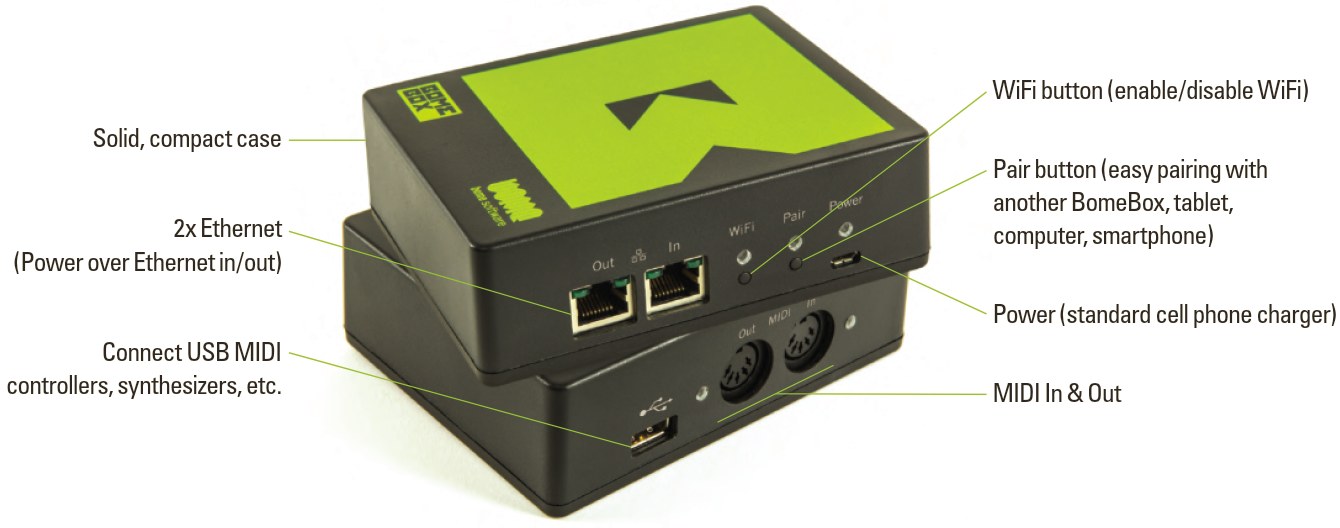
Key Features
- Robust, reinforced ABS case
- MIDI-DIN: 1x input, 1x output. You can add more via the USB Host
- USB Host Type A: supports USB-MIDI devices, USB hubs, multi-port USB-MIDI devices
- Built-in MIDI Router: unlimited virtual MIDI patch bay
- Quick set-up in the web config via tablet, smartphone, or computer
- Create long distance MIDI connections via Ethernet
- MIDI Networking: centralized access to all MIDI devices connected to the Ethernet network
- Built-in 2-port Ethernet switch
- Wireless MIDI connections via built-in WiFi
- WiFi works as Hotspot, hub, or client
- Connects to Windows, macOS, iOS, iPadOS, Linux, and Raspberry Pi using Ethernet or WiFi (free Bome Network tool)
- Allen & Heath digital mixer mixer support via Ethernet
- Unlimited mappings/splits/scenes/conditional routing and MIDI processing with built-in MIDI Translator Pro engine (editor sold separately)
- Use USB QWERTY Keyboards and map to MIDI (since firmware v1.3)
- Standard power supply: 5V micro-USB
- Extra robust power supply: Power-over-Ethernet (PoE) with 48V
- Pass on PoE and MIDI connections using PoE Out port
- Small and light: 180g / 6.3oz
MIDI Translator Pro in a Box
Bome Network
For connecting the BomeBox to computers, tablets, and phones via Ethernet and/or WiFi, use the free Bome Network tool. It’ll allow you to remotely use and route the BomeBox MIDI ports, and any attached MIDI devices.
→ Bome Network Tool
Product Brochure
Newsletter
Photos
(for press-ready high quality photos, see below)


Press-Ready High Quality Photos
Download product photos in high quality: BomeBox_Photos.zip.
BomeBox Web Config
To configure the BomeBox, simply connect any computer, smartphone, or tablet to the BomeBox’ built-in WiFi and invoke the web config in a standard browser like Safari, Chrome, or Firefox.


BomeBox Instructions
 English Instructions (PDF) |
Deutsches Benutzerhandbuch (PDF) |
BomeBox Specifications
-
- Define arbitrary MIDI Thru connections (routes) from/to all connected MIDI devices
- Web Config for easy configuration from any WiFi enabled device
- For advanced mappings, load & execute MIDI Translator Pro project files
(editor sold separately)
- MIDI Connections to computers using high-speed network protocol via Ethernet or WiFi using Bome Network Tool
- MIDI in & out with very low latency
- USB 2 Host (Type A receptacle) for connecting MIDI controllers, synthesizers, serial ports, USB Hubs, etc.
- 2x Ethernet 100MBit/s
- WiFi: 802.11 b/g/n, 2.4 GHz
- Power: requires 0.75W, either
- via Micro-USB Type B: 5V (150mA) with a standard cell phone charger, or
- via Power over Ethernet (PoE, 48V): PoE In port
- Provides power for
- connected USB-MIDI devices (max. 1A at 5V)
- other daisy chained BomeBoxes via PoE Out (if powered via PoE)
- New Features will be made available via firmware update
- Dimensions: 121mm x 96 mm x 38 mm (4.8″ x 3.7″ x 1.5″)
- Weight: 180g
BomeBox Firmware Downloads
We recommend keeping your BomeBox up to date by installing the latest firmware, which includes the newest features, improvements, and bug fixes.
If you ever need to revert to an earlier version, you can download and install previous firmware releases at any time.
Firmware Upgrade Process
After downloading the firmware file (*.bxfw), it is installed using the web config:
- Log into the web config
- Go to the Settings page
- Go to the Backup & Firmware tab
- In the Update BomeBox Firmware section, press the Browse button and navigate to your Downloads folder, selecting the respective .bxfw firmware file
- Back in the web config, press the Update… button
- After a short while, you should see a verification page. You can use it to compare the MD5 checksum to the one displayed next to the download below.
- Press the Proceed button
- Wait until the BomeBox restarted and the power LED stops blinking. That first restart after a firmware upgrade takes approx. 2 minutes.
If you see an error message when logging into the BomeBox web config after upgrading, or experience problems in the web config: clear the web browser cache by refreshing the page or by restarting the web browser. [more info]
→ Video Tutorial for Firmware Upgrade
Download BomeBox Firmware 1.6.1
- Bug fixes and stability improvements
MD5: efc0f4767485ec03055ba4cdb11c0b98
→ Download Archive